- Internal changes (no change to how the mod works in-game).
- Switched from Architectury Loom to Multiloader template, allowing faster updates when big changes to the game happen (like this one).
- Changed config loading from Jankson to Codecs, cutting the size of the mod's `.jar` file down by over 50%.
### Removed
- Migration from old `options.txt` configuration.
- It has been a year since the change, and it was easier to drop it now while also changing other parts of the config handling.
- Internal changes (no change to how the mod works in-game).
- Switched from Architectury Loom to Multiloader template, allowing faster updates when big changes to the game happen (like this one).
- Changed config loading from Jankson to Codecs, cutting the size of the mod's `.jar` file down by over 50%.
### Removed
- Migration from old `options.txt` configuration.
- It has been a year since the change, and it was easier to drop it now while also changing other parts of the config handling.
- Updated to Minecraft 1.21.9.
- This version is not compatible with earlier 1.21 versions.
### Changed
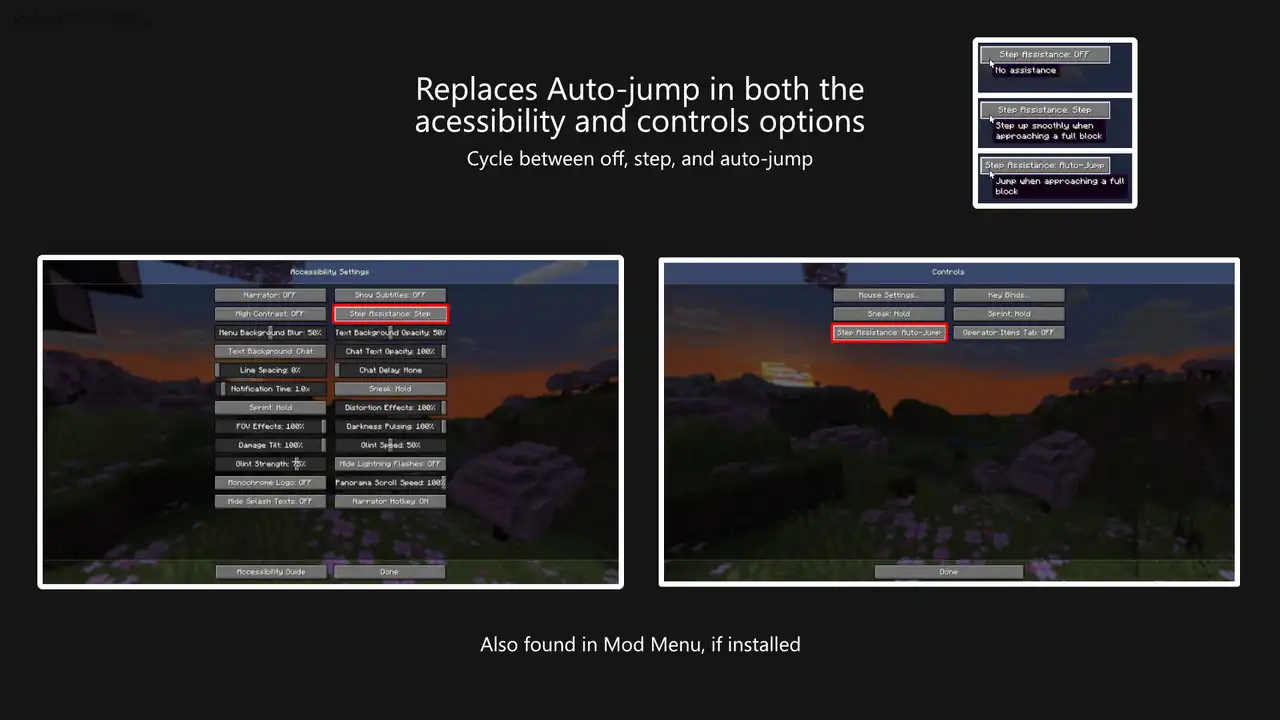
- The step mode option in the Accessibility options screen has moved to the bottom.
- This is mostly due to Mojang removing the Auto-jump option from this screen entirely. I still saw some value in keeping it here, and the easiest place to add it is at the end.
- Updated to Minecraft 1.21.9.
- This version is not compatible with earlier 1.21 versions.
### Changed
- The step mode option in the Accessibility options screen has moved to the bottom.
- This is mostly due to Mojang removing the Auto-jump option from this screen entirely. I still saw some value in keeping it here, and the easiest place to add it is at the end.
- Conflict with Apothic Attributes that caused the step height to be reduced by 0.6 blocks.
- This mod uses the Forge `STEP_HEIGHT_ADDITION` attribute on versions prior to Minecraft 1.20.6.
- Apothic Attributes interprets this attribute as the full step height, rather than a modifier.
- If Apotheisis or Apothic Attributes are installed, this mod will try and set the step height higher to compensate.
- This does not affect Fabric or Minecraft 1.20.6 or later.
- Conflict with Apothic Attributes that caused the step height to be reduced by 0.6 blocks.
- This mod uses the Forge `STEP_HEIGHT_ADDITION` attribute on versions prior to Minecraft 1.20.6.
- Apothic Attributes interprets this attribute as the full step height, rather than a modifier.
- If Apotheisis or Apothic Attributes are installed, this mod will try and set the step height higher to compensate.
- This does not affect Fabric or Minecraft 1.20.6 or later.
- Conflict with Apothic Attributes that caused the step height to be reduced by 0.6 blocks.
- This mod uses the Forge `STEP_HEIGHT_ADDITION` attribute on versions prior to Minecraft 1.20.6.
- Apothic Attributes interprets this attribute as the full step height, rather than a modifier.
- If Apotheisis or Apothic Attributes are installed, this mod will try and set the step height higher to compensate.
- This does not affect Fabric or Minecraft 1.20.6 or later.
- Official support for NeoForge!
- It's been a bit of a journey to reach this point, but it's finally here.
- I should be able to release new versions for both Fabric and NeoForge as quickly as I have been (within a couple of days of a new Minecraft release).
- There have otherwise been no functionality changes to this mod, so this update isn't neessary for those using the Fabric releases.
Note: This will be the final release (barring any urgent bug fixes) for any Minecraft 1.20 versions. This mod is basically feature complete, so this shouldn't be an issue.
- Official support for NeoForge!
- It's been a bit of a journey to reach this point, but it's finally here.
- I should be able to release new versions for both Fabric and NeoForge as quickly as I have been (within a couple of days of a new Minecraft release).
- There have otherwise been no functionality changes to this mod, so this update isn't neessary for those using the Fabric releases.
Note: This will be the final release (barring any urgent bug fixes) for any Minecraft 1.20 versions. This mod is basically feature complete, so this shouldn't be an issue.
- Official support for NeoForge!
- It's been a bit of a journey to reach this point, but it's finally here.
- I should be able to release new versions for both Fabric and NeoForge as quickly as I have been (within a couple of days of a new Minecraft release).
- There have otherwise been no functionality changes to this mod, so this update isn't neessary for those using the Fabric releases.
Note: This will be the final release (barring any urgent bug fixes) for any Minecraft 1.20 versions. This mod is basically feature complete, so this shouldn't be an issue.
- Official support for NeoForge!
- It's been a bit of a journey to reach this point, but it's finally here.
- I should be able to release new versions for both Fabric and NeoForge as quickly as I have been (within a couple of days of a new Minecraft release).
- There have otherwise been no functionality changes to this mod, so this update isn't neessary for those using the Fabric releases.
Note: This will be the final release (barring any urgent bug fixes) for any Minecraft 1.20 versions. This mod is basically feature complete, so this shouldn't be an issue.
- Official support for NeoForge!
- It's been a bit of a journey to reach this point, but it's finally here.
- I should be able to release new versions for both Fabric and NeoForge as quickly as I have been (within a couple of days of a new Minecraft release).
- There have otherwise been no functionality changes to this mod, so this update isn't neessary for those using the Fabric releases.
Note: This will be the final release (barring any urgent bug fixes) for any Minecraft 1.20 versions. This mod is basically feature complete, so this shouldn't be an issue.
- Official support for NeoForge!
- It's been a bit of a journey to reach this point, but it's finally here.
- I should be able to release new versions for both Fabric and NeoForge as quickly as I have been (within a couple of days of a new Minecraft release).
- There have otherwise been no functionality changes to this mod, so this update isn't neessary for those using the Fabric releases.
Note: This will be the final release (barring any urgent bug fixes) for any Minecraft 1.20 versions. This mod is basically feature complete, so this shouldn't be an issue.
- Official support for NeoForge!
- It's been a bit of a journey to reach this point, but it's finally here.
- I should be able to release new versions for both Fabric and NeoForge as quickly as I have been (within a couple of days of a new Minecraft release).
- There have otherwise been no functionality changes to this mod, so this update isn't neessary for those using the Fabric releases.
Note: This will be the final release (barring any urgent bug fixes) for any Minecraft 1.20 versions. This mod is basically feature complete, so this shouldn't be an issue.
- Official support for NeoForge!
- It's been a bit of a journey to reach this point, but it's finally here.
- I should be able to release new versions for both Fabric and NeoForge as quickly as I have been (within a couple of days of a new Minecraft release).
- There have otherwise been no functionality changes to this mod, so this update isn't neessary for those using the Fabric releases.
Note: This will be the final release (barring any urgent bug fixes) for any Minecraft 1.20 versions. This mod is basically feature complete, so this shouldn't be an issue.
- Official support for NeoForge!
- It's been a bit of a journey to reach this point, but it's finally here.
- I should be able to release new versions for both Fabric and NeoForge as quickly as I have been (within a couple of days of a new Minecraft release).
- There have otherwise been no functionality changes to this mod, so this update isn't neessary for those using the Fabric releases.
Note: This will be the final release (barring any urgent bug fixes) for any Minecraft 1.20 versions. This mod is basically feature complete, so this shouldn't be an issue.
- Official support for Forge!
- It's been a bit of a journey to reach this point, but it's finally here.
- I should be able to release new versions for both Fabric and NeoForge as quickly as I have been (within a couple of days of a new Minecraft release).
- There have otherwise been no functionality changes to this mod, so this update isn't neessary for those using the Fabric releases.
Note: This will be the final release (barring any urgent bug fixes) for any Minecraft 1.20 versions. This mod is basically feature complete, so this shouldn't be an issue.
Surprise! A NeoForge version of this mod! I'm hoping to be able to release future NeoForge versions alongside Fabric. I also plan of releasing this mod for a couple of older versions, so stay tuned while I figure that out.
This release is otherwise the same as v2.0.2 for Fabric.
- Per-server (and word) configuration.
- You can now have different settings on different servers and worlds. This should help prevent accidental use on competitive servers with strict anti-cheat.
- In the mod options screen (requires Mod menu), there's a new button labeled "Custom Config for World".
- Keybinding option to toggle Step Assistance mode.
- Find it in the main keybindinds menu. It is not bound to any key by default.
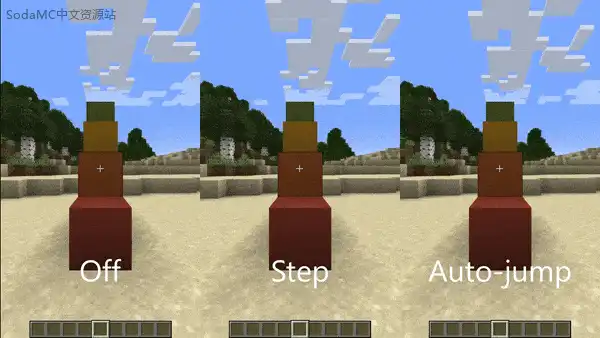
- Cycles between "Off", "Step", and "Auto-Jump".
### Updated
- The config file format has changed.
- This mod no longer stores settings in the main `options.txt`. Instead it will create a `config/accessible-step.json` file.
- Configuration will be migrated to the new file.
- While this won't have much impact on how the mod works for players, it may be important for modpack developers who ship default settings for this mod in their packs.
- Pre-defined settings for individual worlds or servers can be included.
- Per-server (and word) configuration.
- You can now have different settings on different servers and worlds. This should help prevent accidental use on competitive servers with strict anti-cheat.
- In the mod options screen (requires Mod menu), there's a new button labeled "Custom Config for World".
- Keybinding option to toggle Step Assistance mode.
- Find it in the main keybindinds menu. It is not bound to any key by default.
- Cycles between "Off", "Step", and "Auto-Jump".
### Updated
- The config file format has changed.
- This mod no longer stores settings in the main `options.txt`. Instead it will create a `config/accessible-step.json` file.
- Configuration will be migrated to the new file.
- While this won't have much impact on how the mod works for players, it may be important for modpack developers who ship default settings for this mod in their packs.
- Pre-defined settings for individual worlds or servers can be included.
- Per-server (and word) configuration.
- You can now have different settings on different servers and worlds. This should help prevent accidental use on competitive servers with strict anti-cheat.
- In the mod options screen (requires Mod menu), there's a new button labeled "Custom Config for World".
- Keybinding option to toggle Step Assistance mode.
- Find it in the main keybindinds menu. It is not bound to any key by default.
- Cycles between "Off", "Step", and "Auto-Jump".
### Updated
- The config file format has changed.
- This mod no longer stores settings in the main `options.txt`. Instead it will create a `config/accessible-step.json` file.
- Configuration will be migrated to the new file.
- While this won't have much impact on how the mod works for players, it may be important for modpack developers who ship default settings for this mod in their packs.
- Pre-defined settings for individual worlds or servers can be included.
- Per-server (and word) configuration.
- You can now have different settings on different servers and worlds. This should help prevent accidental use on competitive servers with strict anti-cheat.
- In the mod options screen (requires Mod menu), there's a new button labeled "Custom Config for World".
- Keybinding option to toggle Step Assistance mode.
- Find it in the main keybindinds menu. It is not bound to any key by default.
- Cycles between "Off", "Step", and "Auto-Jump".
### Updated
- The config file format has changed.
- This mod no longer stores settings in the main `options.txt`. Instead it will create a `config/accessible-step.json` file.
- Configuration will be migrated to the new file.
- While this won't have much impact on how the mod works for players, it may be important for modpack developers who ship default settings for this mod in their packs.
- Pre-defined settings for individual worlds or servers can be included.
- Misc changes to prepare for easier backports.
- This release is pretty much the same as the last one, but CurseForge displays the last released Minecraft version so I need to release this so it says "1.21".
This is a backport of changes made since the last release.
### Added
- Options for the step, sneak, and sprint height.
- These change the heights you will automatically step up when walking into a wall.
- For players with Mod Menu installed, this option appears in the mod's settings screen.
- For players without Mod Menu installed, you can change the height in your `options.txt`.
This is a backport of changes made since the last release for 1.20.4.
### Added
- Options for the step, sneak, and sprint height.
- These change the heights you will automatically step up when walking into a wall.
- For players with Mod Menu installed, this option appears in the mod's settings screen.
- For players without Mod Menu installed, you can change the height in your `options.txt`.
- Option for changing the step height while sprinting.
- This step height will be used while the player is sprinting, or when they're holding down the sprint key.
- For players with Mod Menu installed, this option appears in the mod's settings screen.
- For players without Mod Menu installed, you can change the height in your `options.txt`.
- Option to change the range of the step height sliders.
- Previously the sliders were always from 0 to 10 blocks, which made it difficult to select specific values.
- Since it's more likely that players want step heights closer to the vanilla value, these sliders are now limited to 2.5 blocks by default.
- The option to allow the sliders to go up to 10 blocks remains for fun.
### Changed
- Tooltips for options in the settings screen now have periods/full stops (`.`) at the end, to be consistent in style with Minecraft's tooltips.
- Options for changing the step height.
- For users with Mod Menu installed, this appears in the mod's settings screen.
- For users without Mod Menu installed, you can change the heights in your `options.txt`.
### Updated
- Add more information to the Mod Menu page.
- Update dependencies for development.
- This should have no effect while using the mod.