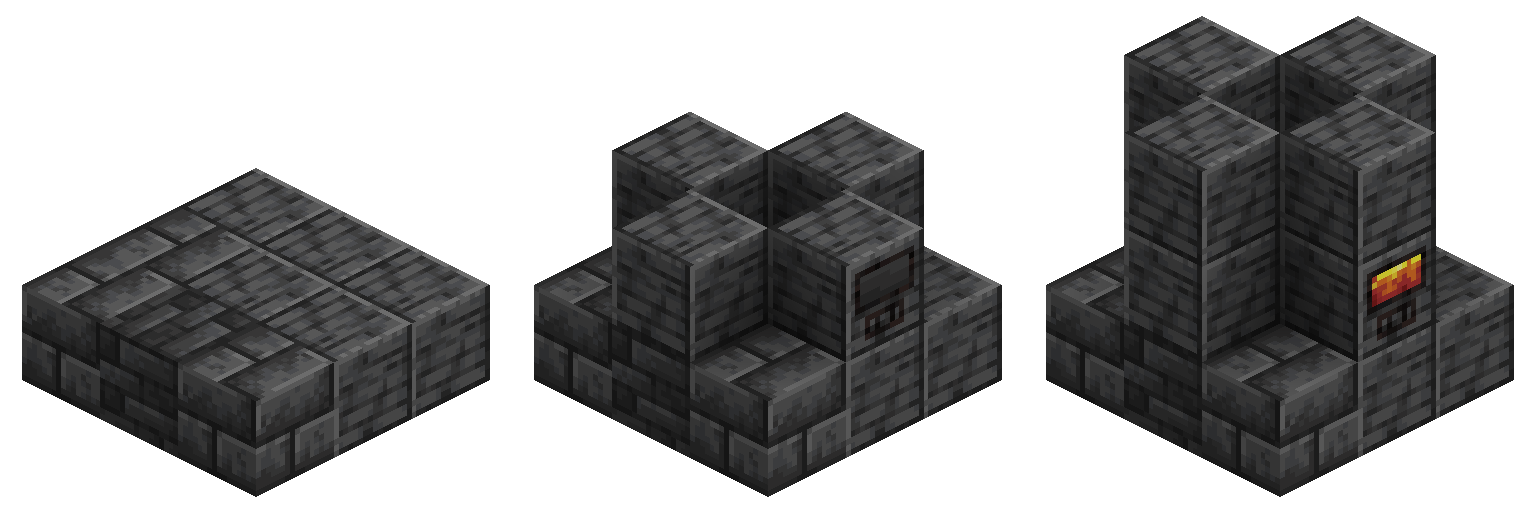
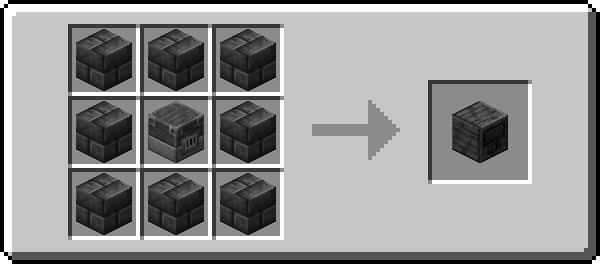
- Fixed a duplication issue when feeding buckets into the Alloy Forge by hand (#173)
- Ported the fix for bad RecipeInjector check to 1.21.10, allowing you to override Alloy Forge Controller Recipes
- Fixed a duplication issue when feeding buckets into the Alloy Forge by hand (#173)
- Ported the fix for bad RecipeInjector check to 1.21.10, allowing you to override Alloy Forge Controller Recipes
- Fixed a duplication issue when feeding buckets into the Alloy Forge by hand (#173)
- Ported the fix for bad RecipeInjector check to 1.21.10, allowing you to override Alloy Forge Controller Recipes
- Fixed a duplication issue when feeding buckets into the Alloy Forge by hand (#173)
- Ported the fix for bad RecipeInjector check to 1.21.10, allowing you to override Alloy Forge Controller Recipes
## Changes:
- Change modid to `alloy-forgery` to be consistent with other WispForest mods
## Fixes:
- Fix issues with data loader dependencies not being set leading to issues with forge tiers not being bound
- Fix for issues with forge definitions not loading leading to issues like crashing and such
## Changes:
- Change modid to `alloy-forgery` to be consistent with other WispForest mods
## Fixes:
- Fix issues with data loader dependencies not being set leading to issues with forge tiers not being bound
- Fix for issues with forge definitions not loading leading to issues like crashing and such
## Changes:
- Change modid to `alloy-forgery` to be consistent with other WispForest mods
## Fixes:
- Fix issues with data loader dependencies not being set leading to issues with forge tiers not being bound
- Fix for issues with forge definitions not loading leading to issues like crashing and such
## Changes:
- Change modid to `alloy-forgery` to be consistent with other WispForest mods
## Fixes:
- Fix issues with data loader dependencies not being set leading to issues with forge tiers not being bound
- Fix for issues with forge definitions not loading leading to issues like crashing and such
# Alloy Forgery 3.0.0
**Warning: This is a big and complex update which could break existing mod compat and datapacks.**
This update changes the format used to load custom Alloy Forges with the plan being to allow for the entire mod being configurable with data and resourcepacks. Furthermore, this version brings Alloy Forgery up to 1.21.10 including support for the NeoForge Mod platform. Documentation for the new data format will be available on https://docs.wispforest.io/alloy-forgery/home in the upcoming days.
## Changes
- You can now disable input slots inside the Alloy Forge, similar to the Crafter
- Alloy Forge screen now supports dark mode
- This is configurable in the Alloy Forgery config, accessible from the ingame mod menu, running `/owo-config alloy-forgery` in-game, or the config folder.
- Reworked the Alloy Forge data format, splitting it up to make it more configurable.
## Technical Changes
- Forge definitions are mostly unchanged.
- Declared in the `{datapack_namespace_here}/alloy_forge/controller` folder Only require `materials` and `additional_materials` like before
- Defining Forge Tiers is now required.
- Forge Tiers define properties/stats for your different Alloy Forges.
- Properties available:
- `tier`, which is required
- `speed_multiplier`, affects smelting speed
- `fuel_consumption_multiplier`, affects fuel usage
- `fuel_capacity`, affects fuel capacity
- `parent_tier`, allows for inheriting properties from a different tier
- Forge definitions require Tier Bindings in `{datapack_namespace_here}/alloy_forge/tier_binding`.
- These data values bind the stats between a specified controller to a specific tier.
- Alloy Forge screen layout is now code-driven, which means the layout is no longer resourcepackable
- Split up the Alloy Forge screen textures, making them much more configurable
# Alloy Forgery 3.0.0
**Warning: This is a big and complex update which could break existing mod compat and datapacks.**
This update changes the format used to load custom Alloy Forges with the plan being to allow for the entire mod being configurable with data and resourcepacks. Furthermore, this version brings Alloy Forgery up to 1.21.10 including support for the NeoForge Mod platform. Documentation for the new data format will be available on https://docs.wispforest.io/alloy-forgery/home in the upcoming days.
## Changes
- You can now disable input slots inside the Alloy Forge, similar to the Crafter
- Alloy Forge screen now supports dark mode
- This is configurable in the Alloy Forgery config, accessible from the ingame mod menu, running `/owo-config alloy-forgery` in-game, or the config folder.
- Reworked the Alloy Forge data format, splitting it up to make it more configurable.
## Technical Changes
- Forge definitions are mostly unchanged.
- Declared in the `{datapack_namespace_here}/alloy_forge/controller` folder Only require `materials` and `additional_materials` like before
- Defining Forge Tiers is now required.
- Forge Tiers define properties/stats for your different Alloy Forges.
- Properties available:
- `tier`, which is required
- `speed_multiplier`, affects smelting speed
- `fuel_consumption_multiplier`, affects fuel usage
- `fuel_capacity`, affects fuel capacity
- `parent_tier`, allows for inheriting properties from a different tier
- Forge definitions require Tier Bindings in `{datapack_namespace_here}/alloy_forge/tier_binding`.
- These data values bind the stats between a specified controller to a specific tier.
- Alloy Forge screen layout is now code-driven, which means the layout is no longer resourcepackable
- Split up the Alloy Forge screen textures, making them much more configurable
# Alloy Forgery 3.0.0
**Warning: This is a big and complex update which could break existing mod compat and datapacks.**
This update changes the format used to load custom Alloy Forges with the plan being to allow for the entire mod being configurable with data and resourcepacks. Furthermore, this version brings Alloy Forgery up to 1.21.4 including support for the NeoForge Mod platform. Documentation for the new data format will be available on https://docs.wispforest.io/alloy-forgery/home in the upcoming days.
## Changes
- You can now disable input slots inside the Alloy Forge, similar to the Crafter
- Alloy Forge screen now supports dark mode
- This is configurable in the Alloy Forgery config, accessible from the ingame mod menu, running `/owo-config alloy-forgery` in-game, or the config folder.
- Reworked the Alloy Forge data format, splitting it up to make it more configurable.
## Technical Changes
- Forge definitions are mostly unchanged.
- Declared in the `{datapack_namespace_here}/alloy_forge/controller` folder Only require `materials` and `additional_materials` like before
- Defining Forge Tiers is now required.
- Forge Tiers define properties/stats for your different Alloy Forges.
- Properties available:
- `tier`, which is required
- `speed_multiplier`, affects smelting speed
- `fuel_consumption_multiplier`, affects fuel usage
- `fuel_capacity`, affects fuel capacity
- `parent_tier`, allows for inheriting properties from a different tier
- Forge definitions require Tier Bindings in `{datapack_namespace_here}/alloy_forge/tier_binding`.
- These data values bind the stats between a specified controller to a specific tier.
- Alloy Forge screen layout is now code-driven, which means the layout is no longer resourcepackable
- Split up the Alloy Forge screen textures, making them much more configurable
# Alloy Forgery 3.0.0
**Warning: This is a big and complex update which could break existing mod compat and datapacks.**
This update changes the format used to load custom Alloy Forges with the plan being to allow for the entire mod being configurable with data and resourcepacks. Furthermore, this version brings Alloy Forgery up to 1.21.4 including support for the NeoForge Mod platform. Documentation for the new data format will be available on https://docs.wispforest.io/alloy-forgery/home in the upcoming days.
## Changes
- You can now disable input slots inside the Alloy Forge, similar to the Crafter
- Alloy Forge screen now supports dark mode
- This is configurable in the Alloy Forgery config, accessible from the ingame mod menu, running `/owo-config alloy-forgery` in-game, or the config folder.
- Reworked the Alloy Forge data format, splitting it up to make it more configurable.
## Technical Changes
- Forge definitions are mostly unchanged.
- Declared in the `{datapack_namespace_here}/alloy_forge/controller` folder Only require `materials` and `additional_materials` like before
- Defining Forge Tiers is now required.
- Forge Tiers define properties/stats for your different Alloy Forges.
- Properties available:
- `tier`, which is required
- `speed_multiplier`, affects smelting speed
- `fuel_consumption_multiplier`, affects fuel usage
- `fuel_capacity`, affects fuel capacity
- `parent_tier`, allows for inheriting properties from a different tier
- Forge definitions require Tier Bindings in `{datapack_namespace_here}/alloy_forge/tier_binding`.
- These data values bind the stats between a specified controller to a specific tier.
- Alloy Forge screen layout is now code-driven, which means the layout is no longer resourcepackable
- Split up the Alloy Forge screen textures, making them much more configurable
Small update includes some fixes and changes to mechanics for blasting adaptation:
### Features
- Adjust blasting adaptation recipes default input amount from 1 to 2 with higher tier output only.
- Furthermore there are now options to adjust various aspects of the adaption layers with such documented on the [wiki](https://docs.wispforest.io/alloy-forgery/recipe-adaptation/)
- Update recipe syntax to be more uniform between input and outputs which is documented on the new wiki!
- **[Major Change]** Add glass recipe for the forge
> You can access the config via Mod Menu, in-game with the /owo-config command, or by finding the config file in your instances config folder
### Fixes:
- Fix issues with recipes deserialization due to problems with ingredient equality
- Add recipe id to error with recipes using tagged output if occurs
This update brings some fixes for Ticking related issues and also adds support for Adapting Blasting Furnace Recipes to work within the forge
### Features
- Adapt Blast Furnace Recipes Dynamically to Alloy Forge Recipes (API Information planned for the future)
- Reduce the tier of the Deepslate Forge Controller (2 -> 1)
- This change was made to make raw ore doubling harder to get. You now need to seek out Prismarine or Blackstone (The Nether) to make a better Forge Controller.
### Fixes:
- Fix tick related lag when idle or crafting
- Logic and caching was added for recipe checking, which greatly improves performance
- Fix mishandling of Fuel Remainders, where stacks would be entirely replaced with the remainders
- Various fixes for compatibility recipes, mainly related to common tags
# 2.0.20
- Fixed a crash related to KubeJS (#102, #103, #98)
- Added Spanish localization (es_es, thanks Boxadactle!)
- Added Italian localization (it_it, thanks CapoFantasma97!)
- Added Taiwanese localization (zh_it, thanks EvanHsie0405!)
- Fixed some issues related to raw block recipes and datagen
Note: This release marks the end of maintenance for 1.19.2.
# 2.0.20
- Fixed a crash related to KubeJS (#102, #103, #98)
- Added Spanish localization (es_es, thanks Boxadactle!)
- Added Italian localization (it_it, thanks CapoFantasma97!)
- Added Taiwanese localization (zh_it, thanks EvanHsie0405!)
- Fixed some issues related to raw block recipes and datagen
Note: This release marks the end of maintenance for 1.19.2.
# 2.0.19
- Added compatability for viewing Alloy Forge recipes via EMI (thanks fzzyhmstrs!)
- Fixed some broken ore tags, making some recipes unable to be crafted
- Fixed the Prismarine Brick Forge Controller not dropping its block when broken
- Fixed an issue where stacked fuel items (I.E. Stackable Buckets) would override the stack when used directly on the Forge Controllers
# 2.0.19
- Added compatability for viewing Alloy Forge recipes via EMI (thanks fzzyhmstrs!)
- Fixed some broken ore tags, making some recipes unable to be crafted
- Fixed the Prismarine Brick Forge Controller not dropping its block when broken
- Fixed an issue where stacked fuel items (I.E. Stackable Buckets) would override the stack when used directly on the Forge Controllers
## Additions
Simplified Chinese translations, by ErrorPower2001
Korean translations, by gyular
## Fixes
This build now properly supports new Fabric Transfer API. This resolves a crash that would happen with older versions on 1.19.2 when trying to insert lava into a Forge Controller via fluid pipes or hoppers
## Changes
- More fuzzy recipe matching - recipes which accept the same item multiple times no longer need to be spread out across the Forge Inventory (Blodhgarm, #48)
- Default recipes for most modded minerals and alloys (Blodhgarm, #63)
- Recipe format changes -> inputs can now also use the `count` property (Blodhgarm, #61)
- REI integration was updated to reflect the recipe system changes and support recipe autofill in the Forge Inventory
## Changes
- The automatically generated forge controller recipes can now be overriden by datapacks
## Fixes
- Custom Forges now accept liquid fuel ([#86 on Mythic Metals](https://github.com/Noaaan/MythicMetals/issues/86))
- The lava in the fuel buffer now renders correctly when the block atlas is not 1024x1024
## Fixes
- Fuel consumption in high-tier forges is now more accurate and works correctly according to the intended formula. This also means they run a bit slower, as an error in the speed calculation was resposible for the fuel issues